
Homes.com Real Estate & Rent
CoStar Homes.com Android TeamHouse & Home
4.73.05K Reviews
- Version
- 18.8.0
- Installs
- 1.00M
- Age Rating
- Everyone
Screenshots



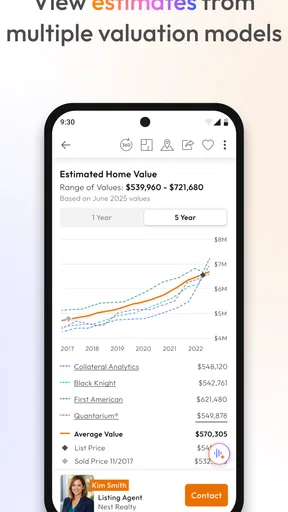


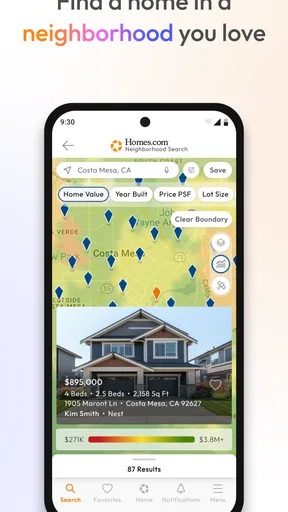

Our Review of Homes.com Real Estate & Rent
 Analysis by Appyee
Ever find yourself daydreaming about owning the perfect house, but have no idea where to even start looking? Well, let me tell you about my recent experience with the Homes.com Real Estate Search app. This nifty little tool has been a game-changer in my quest to find the ultimate living space. Whether you’re searching for a cozy apartment downtown or a sprawling ranch in the suburbs, this app has got you covered.
What I Look for Before Trusting a Listing App
Real estate searches involve more than browsing attractive photos. You may enter a location, compare homes, and weigh details that affect a major financial decision, so I pay attention to whether an app helps me investigate rather than pushing me toward a quick choice. Homes.com is a free home-search app from CoStar Homes.com Android Team. It has a 4.7 average from around 19,000 ratings, and more than 1 million installs. Those figures suggest that plenty of people use it, but they do not tell me whether a specific listing fits my needs; I still treat each property as a lead to check carefully.
The app is rated for Everyone, and its current version is 17.5.0. It has been available since September 10, 2012, and requires Android 10 or later. That makes it worth considering for people using a recent Android phone, while anyone on an older system should check compatibility before planning a search around it. I would also keep the distinction clear between browsing a listing in an app and confirming important details directly through the people involved in a sale or rental.
How I Use the Search Without Rushing
For me, the most useful starting point is a practical shortlist, not a fantasy list. I would set a location and budget I can defend, then use the filters to narrow the options by the details that matter most, such as bedrooms. After that, I would look at the map to see how listings sit within the area rather than judging each home in isolation. A property that seems appealing on its own may be a poor fit once I consider its position relative to work, school, or the places I visit regularly.
One useful habit is to keep the first search broad enough to reveal the local market, then tighten it only after seeing what is actually available. If the filters are too strict at the beginning, I can accidentally exclude homes that might work with a different layout or a small compromise. I would compare a few plausible options and note why each one made the shortlist. That makes later conversations more focused and helps prevent a polished photo gallery from becoming the main reason I favor a property.
For a realistic weekday search, I might check homes near a commute area during a lunch break, save the promising candidates in my own notes, and revisit them later with a calmer eye. I would compare the map locations and listing details before arranging any next steps. This approach turns quick browsing into a decision process: the app helps me discover possibilities, while my notes keep priorities consistent when several homes start to blur together.
All About the Features
The first thing that caught my attention was the intuitive interface. As soon as you open the app, you’re greeted with a clean and straightforward dashboard. No overwhelming ads or confusing menus—just a clear path to finding your dream home. You can easily filter your searches based on location, price, number of bedrooms, and more. It’s like having a personal real estate agent right in your pocket.
One of my favorite features is the interactive map. You can literally see what's available in your desired area, complete with detailed property information. Tap on any listing, and you’ll get everything from photos to floor plans. It’s almost like a virtual tour, minus the awkward small talk with agents.
Why I Love It
Now, I’ve got to say, the Homes.com Real Estate Search app is more than just a property listing tool. It’s got a bunch of handy extras that make house hunting less stressful. For instance, the affordability calculator is a lifesaver. It helps you figure out what you can realistically afford, taking into account your income, debts, and other factors. This way, you won’t waste time on homes that are way out of your budget.
Also, the neighborhood ratings and school information are a huge plus. If you’re like me, you want to know more than just the specs of a house. You want to know if the area is safe, what the schools are like, and if there’s a good coffee shop nearby. This app gives you all that intel and more.
Making the Map and Local Details Work for You
I find the map most valuable when I use it to test a specific routine, not simply to admire where a listing pin appears. For example, if I am comparing two homes, I would look at where each sits in relation to the parts of town I actually need to reach. Then I would open the individual listings and compare their details instead of assuming two nearby pins mean similar surroundings. The map narrows the field, but it cannot decide whether the daily route or the block feels right for me.
School information and neighborhood ratings can help me form questions, but I would not treat either as a final verdict on a community. A rating compresses a complicated place into a quick signal, while a school detail may matter differently depending on a household’s needs. I would use those sections to identify what I want to learn next, then verify important decisions through direct research and a visit when possible. That is a more careful use of the app than treating a single score as a guarantee.
The affordability calculator is similarly best used as an early reality check. It can help me stop browsing homes that are plainly outside the range I have in mind, but I would not mistake an estimate for a complete personal budget. I would leave room to consider the costs and circumstances that matter to me beyond the result on a screen. The practical benefit is not a definitive answer; it is a faster way to notice when my search needs to become more realistic.
Privacy, Permission Choices, and Personal Details
Searching for a home can involve sensitive decisions, and the information I choose to enter deserves the same care as the listings I inspect. I would avoid typing personal or financial details unless I understand why the app is asking for them and how they relate to a feature I want to use. In particular, I would treat any affordability inputs as private planning information and enter only what is needed for my own estimate. I would not put account credentials, payment details, or identity documents into a search workflow unless a clear, necessary step called for them.
My approach to permissions is simple: when Android asks for access, I pause and consider whether it makes sense for what I am doing at that moment. I do not grant access automatically just because a prompt appears. If I am only browsing by a location I can type in, I would first ask myself whether any requested device access is essential to that task. I would also check the app’s current permission controls in Android settings, since those choices can be reviewed and adjusted there.
I cannot judge an app’s data practices from a search screen alone, so I keep my own actions deliberate. I would read the privacy information available in the app and its store page, and revisit it if I decide to create or use an account. Before sharing details with an agent or another party, I would check what I am sending and whether it is necessary for the conversation. That little pause matters when a casual property search starts turning into a serious inquiry.
Where It Fits Compared with Other Ways to Search
Compared with starting from a general web search, Homes.com gives me a more focused place to browse property listings, use filters, and connect a listing with a map location. That structure is useful when I want to move between the home itself and the surrounding area without opening a collection of unrelated pages. Its school and neighborhood information also gives me more context than a bare list of addresses, though I would still use other sources to check details that could influence a long-term decision.
Compared with contacting an agent first, browsing on my own is less pressured and helps me arrive with clearer questions. The trade-off is that an app cannot walk through a property with me or understand all the priorities I have not yet articulated. For a renter who only wants a quick list of available options, or a buyer who already relies on a local professional’s shortlist, another route may be more efficient. I see this app as a discovery and comparison tool, not a replacement for an in-person visit, direct questions, or professional advice.
One small but useful comparison trick is to look at a home’s listing details and its map position separately before deciding whether it belongs on my shortlist. That prevents a strong interior photo from distracting me from location, and it prevents a convenient pin from making me overlook details inside the property. Keeping those judgments distinct makes the search more balanced and exposes trade-offs earlier, when it is easier to move on to another option.
Who Will Get the Most from It
I think Homes.com is a good fit for someone at the early or middle stage of a home search: a first-time buyer trying to learn what different areas offer, a renter comparing locations, or a household weighing school information alongside a property’s layout. It also suits people who prefer visual browsing and want to move between filters, photos, and a map as they refine what matters. The free price makes it easy to try as a search companion without treating it as a major purchase.
I would be more cautious about recommending it as the only tool for someone who needs a highly specialized search process, wants an authoritative answer about a neighborhood, or expects an app to settle affordability on its own. It may also be the wrong starting point for anyone unable to run Android 10 or later. In those situations, checking compatibility, working with a local professional, or using another suitable route can save time. The right choice depends on whether the app’s browsing tools match the actual decision in front of you.
Wrapping It Up
In a sea of real estate apps, the Homes.com Real Estate Search app stands out for its ease of use, comprehensive features, and the way it feels like it’s tailored just for you. Whether you’re a first-time buyer or looking for your next investment property, this app is a solid companion on your real estate journey. Give it a download, and happy house hunting!
My cautious verdict is that I would use it to build and refine a shortlist, then verify the details that matter before making any commitment. Its filters, interactive map, affordability calculator, and local context can make the search more organized, but they work best when paired with realistic priorities and independent checks. If you approach it that way, it can be a helpful starting point rather than a substitute for the judgment a home purchase or rental deserves.
Privacy and Permissions
See what permissions an app requests and how it handles your data.
- Location
- approximate location (network-based), precise location (GPS and network-based)
- Microphone
- record audio
- Other
- view network connections, full network access, change your audio settings, run at startup, prevent device from sleeping, Google Play license check, read Google service configuration
Verdict
Strengths of Homes.com Real Estate & Rent
- User-friendly interface for easy navigation.
- Comprehensive property listings nationwide.
- Advanced search filters enhance usability.
- Push notifications for new listings.
- Includes detailed neighborhood info.
Limitations of Homes.com Real Estate & Rent
- Limited international property listings.
- Occasional app crashes reported.
- Some features require account signup.
- Map view can be slow to load.
- Ads may interrupt browsing experience.
Similar Picks in This Category
View All
Universal TV Remote Control
CodeMatics Media Solutions3.9

AlfredCamera Home Security app
Alfred Systems Inc.4.7

Planner 5D: AI Home Design
Planner 5D4.5

Universal Tv Remote-Cast to TV
One Music Player4.1

Zillow: Homes for Sale & Rent
Zillow Group4.8

99acres Buy/Rent/Sell Property
infoedge.com4.3
Frequently Asked Questions
What features does the Homes.com Real Estate Search app offer?
The Homes.com Real Estate Search app provides a comprehensive suite of features, including detailed property listings, high-resolution photos, virtual tours, and neighborhood insights. Users can filter searches by price, location, and amenities, and save their favorite properties. It also offers mortgage calculators and contact options for real estate agents.
Is the Homes.com app free to use?
Yes, the Homes.com Real Estate Search app is free to download and use on both Android and iOS platforms. While the app provides extensive features at no cost, certain premium services or features, such as direct agent consultations or advanced market analysis tools, may require additional fees.
Can I use the Homes.com app to find rental properties?
Absolutely. The Homes.com app caters to both buyers and renters, featuring a wide array of rental listings. Users can search for rental properties using tailored filters to match their specific needs, such as budget, number of bedrooms, and pet-friendly options, ensuring a comprehensive rental search experience.
How accurate is the property information on the Homes.com app?
The Homes.com app strives to provide accurate and up-to-date information by sourcing its data directly from MLS listings and reputable real estate agents. However, users are encouraged to verify property details and consult with a professional agent for the most current and precise information before making any decisions.
Does Homes.com offer support for international property searches?
Currently, the Homes.com app primarily focuses on real estate within the United States. While it provides extensive coverage across the country, international property searches are limited. For users interested in properties outside the U.S., considering other platforms dedicated to international real estate may be beneficial.
